ERP
- SAP
- IFS
- Logo
- Netsis
- Canias

Agents that take the request, compare bids on the same terms, recommend the supplier and draft the purchase order in your ERP. You approve the spend.
Agents already doing real work.
hours saved

Agents at work in enterprise teams


Requests come from the plan, a form or an email. The agent asks suppliers for quotes, puts the answers on the same terms, recommends one and drafts the order. You see what it compared and why. Live in four weeks.

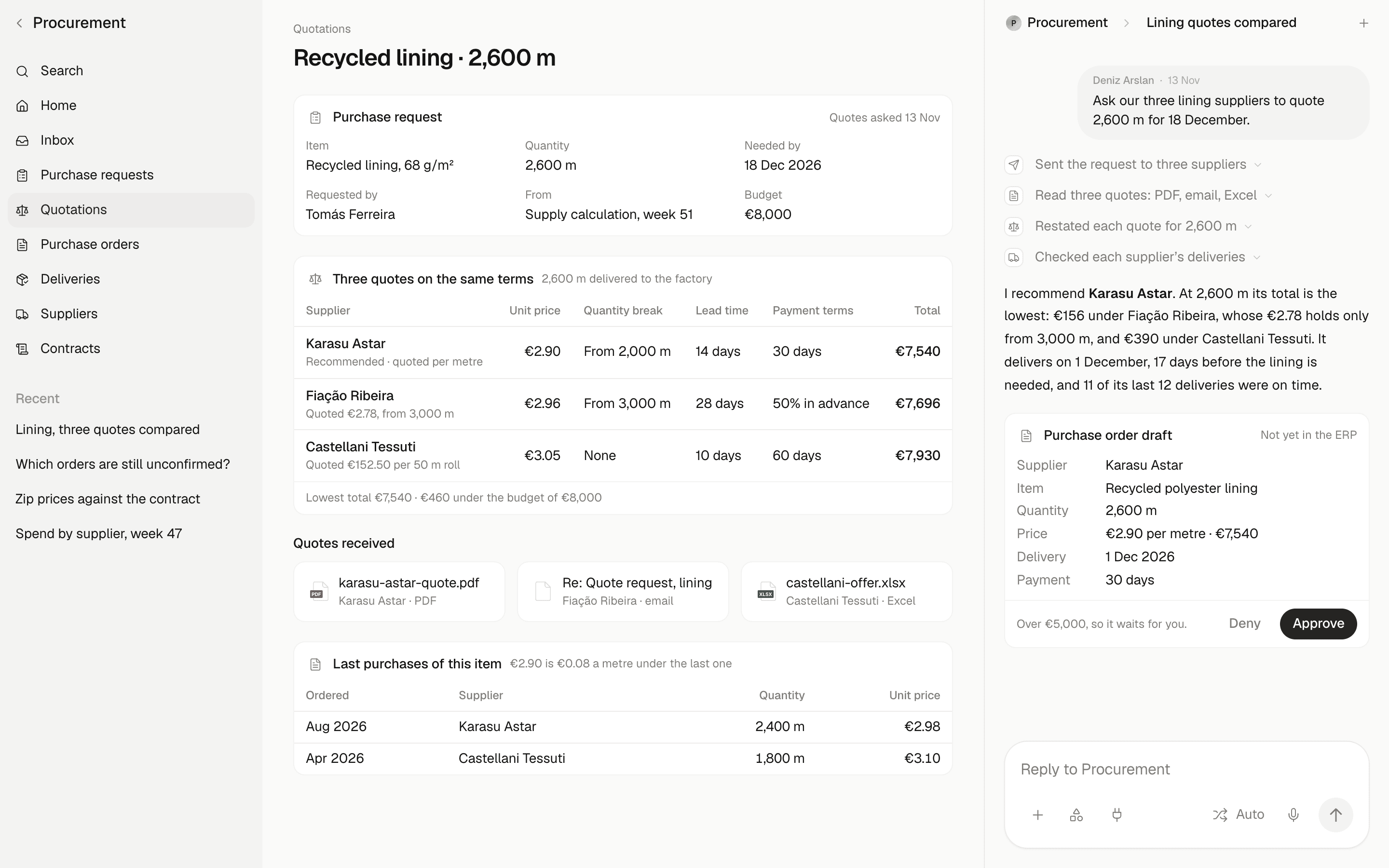
One agent on every request, with the buyer deciding.

Sourcing
The agent sends the request for quotation, reads the answers and puts unit price, quantity, lead time and payment terms side by side on the same terms.

Ordering
From the supply calculation or an approved request, the agent drafts the order in your ERP’s own fields with the recommended supplier. It is placed when you approve.

Follow-up
The agent chases order confirmations, checks promised dates against need dates and tells the buyer which orders are at risk.
The parts of the procurement agent, each behind the approval you set.
Requests from email, forms and the plan turned into one clean record: item, quantity, need date, budget.
Email · Forms · Supply calculation
2,600 m delivered to the factory
| Supplier | Per metre | Total |
|---|---|---|
Karasu Astar | €2.90 | €7,540 |
Fiação Ribeira | €2.96 | €7,696 |
Castellani Tessuti | €3.05 | €7,930 |
Quotes in any format read and compared on the same terms, with the differences that matter called out.
Unit price · Lead time · Payment terms · Minimum order
Orders drafted in your ERP and placed after approval by amount, supplier or category.
Drafts · Approval limits · Audit log
Confirmations chased, promised dates tracked, late and short deliveries flagged to the buyer.
Confirmations · Promised dates · Late orders · Goods received
Each price checked against the last purchase and the contract, with spend by supplier and category in the weekly brief.
Price history · Contract price · Spend by supplier · Weekly brief
Each is a named workflow with an owner and a target, not a general assistant. We fit it to your ERP, your suppliers and your approval limits.
Intake
A request arrives as an email, a form or a line in the supply calculation. The agent turns it into one record with the item, quantity, need date and budget, and asks the requester for whatever is missing. The buyer starts from a complete request.
Sourcing
The agent sends the request for quotation to the suppliers you name and reads what comes back, in whatever format it arrives. It restates each quote for the same quantity, delivery and payment terms and recommends one. The choice stays with your buyer.
Ordering
From the supply calculation or an approved request, the agent drafts each order in your ERP’s own fields: supplier, price, quantity and delivery date. It checks the price against the contract and the last purchase. The order is placed only after the approval your limits call for.
Follow-up
The agent asks each supplier to confirm the order, reminds the ones that have not answered and records the promised date. Each promised date is checked against the need date. The buyer gets the orders at risk, each with a reply to the supplier drafted for approval.
Tenders
Tender answers arrive as long documents and spreadsheets, each laid out its own way. The agent reads every answer against the lines of your tender, restates prices, scope and conditions on the same terms and lists what each bidder left out. Your team scores and awards.
Invoices
The agent reads each supplier invoice and matches it to its purchase order and goods receipt: quantity, price and terms. Matched invoices wait for your approval to post. Mismatches go to the buyer with the reason.
per invoice for the best finance teams, against $12.88 for the rest
Ardent Partners, 2024
No migration, and nothing changes for your suppliers. The agent reads and writes through the access you grant, in our cloud, yours or on-premise.
Our engineers work inside your environment until the first workflow is live, then hand it to your team.
No order is placed and no supplier is contacted outside the rules you set. Every step is logged, and the platform runs in our cloud, yours or on-premise.
Encryption at rest, for databases, files and stored credentials
Encryption in transit, HTTPS on every connection
Hosted where you choose: our cloud, yours, or fully on-premise

Sales, data and customer-experience agents, from exploration to voice
Workspaces · Case study
The figures beside each workflow are published research and industry benchmarks, not results from our own deployments. Sources:
Only as far as you allow. Every order passes an approval limit: by amount, by supplier, by category. Start with approval on every order and loosen it per category.
Next step
Pick one category. See it quoted, compared and ordered on your own data in four weeks.